By Bill Howard, Copier & Printer Specialist · US Office Solutions · Published October 12, 2026
A multifunction printer (MFP) is a single office machine that prints, copies, scans, and faxes. A downtown Orlando law office we set up last spring had four devices on one credenza doing those four jobs badly; we pulled all of them and put down one leased MFP, and the credenza is now a coffee station. That is the whole idea behind the machine, and this guide covers what it is, what it does, and how to tell a real business MFP from the cheap all-in-one before you sign a lease.
The short version
- An MFP is one device that prints, copies, scans, and faxes — the “all-in-one” that replaced four separate machines.
- The office “copier” and the “MFP” are the same thing in 2026. The name is habit, not a difference.
- The real divide is class, not type: a business MFP is shared, metered, and serviced; a big-box all-in-one is not built for office load.
- Lease one by sizing it to your monthly page count, deciding color or black-and-white, and confirming toner and service are in the rate.
What is a multifunction printer?
A multifunction printer is one device that combines printing, copying, scanning, and usually faxing. Ricoh, one of the three lines we carry, defines an MFP in its glossary as “a device that combines several capabilities,” naming printing, scanning, copying, and faxing as the core set. You’ll also hear it called an all-in-one printer or a multifunction device (MFD); the words are interchangeable. What that name should set in your head is the scope of the thing: this isn’t a printer with a scanner stuck on top; it’s a shared document station that also prints.
The four jobs one MFP covers
An office MFP does the work that used to need four machines, and each job has a wrinkle worth knowing.
Printing is the baseline: it prints from any computer or phone on the network, in color or black-and-white.
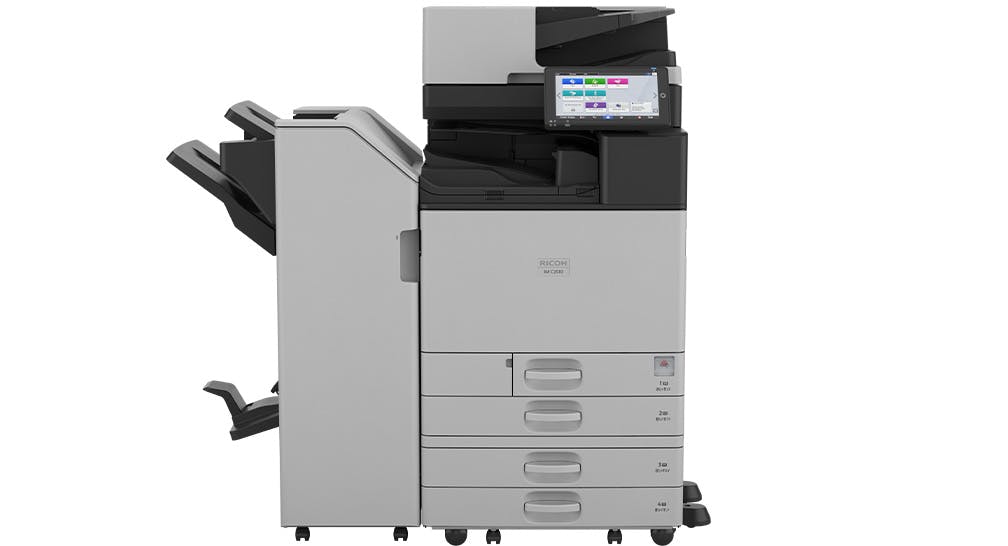
Copying is what the old “copier” name refers to, duplicating a stack of paper through an automatic document feeder, with sorting, stapling, and hole-punching on the bigger units.
Scanning is the function most offices underestimate and then use constantly. A business MFP scans straight to email, to a network folder, or to the cloud, which is how a paper-heavy office goes mostly digital without buying software.
Faxing is still standard on business machines, now usually running over the internet instead of a phone line. That still matters to the law firms, medical offices, and title companies around Central Florida that fax every single day.
The point of all four living in one box is consolidation: one driver to install, one service contract, one meter, one footprint.
Copier, MFP, and all-in-one are the same machine
For practical purposes, the “copier” a dealer rolls in and a multifunction printer are the same device. The floor-standing department machines kept the old “copier” label because they grew out of the copy machines of the 1990s, but every one of them prints, scans, and faxes now. If you want the full breakdown of where a plain printer still makes sense, we cover that in our guide on the difference between a copier and a printer. The short version is that the label on the box is habit; what decides your purchase is the class of machine, which is the next section.
Business-class MFP vs. the big-box all-in-one
Here is the distinction nobody shopping online explains, and the one that quietly burns people. A $300 all-in-one from an office-supply store and a leased business MFP are both technically “multifunction printers,” but they’re built for completely different lives. The consumer unit is built for one or two people and a few hundred pages a month. The business machine is built to be shared by a department and run thousands of pages a month for years. As one IT admin on Reddit put it about the consumer boxes under office load, they are “almost universally hot trash.”
Here is how the two classes compare on the things that actually bite:
| Factor | Desktop all-in-one | Business-class MFP |
|---|---|---|
| Built for | 1 to 2 users, a few hundred pages/month | A shared team, thousands of pages/month |
| Paper handling | One small tray, manual feed | Multiple large trays, automatic document feeder |
| Finishing | None | Staple, sort, hole-punch, booklet |
| Supplies | You buy cartridges at retail | Toner included in the lease |
| Service | Ship it back to the maker | Local dealer, on-site, under contract |
| Cost model | Buy outright, pay per cartridge | Lease plus a metered cost per page |
| Lifespan under load | Months before trouble | Years |
Five reasons offices consolidate onto one MFP
Once more than a couple of people share one machine, the MFP earns its keep on five fronts.
It shrinks the footprint and simplifies IT. One networked device replaces a printer, a copier, a scanner, and a fax machine, which leaves you one driver to deploy and one thing to support instead of four.
The cost per page is lower and predictable. On the metered copier leases we write across Orlando and Central Florida, black-and-white pages run about 1 to 2 cents each and color about 7 to 9 cents, and that click charge includes toner and service. Desktop color output from a retail cartridge often lands north of 15 cents a page once you do the math. We break the per-page numbers down in our cost-per-copy guide.
Scan-to-email turns paper into workflow. The scanner is the quiet productivity win; staff send a PDF straight to an inbox or a folder rather than walking paper around.
Energy use drops, especially on inkjet. Most business MFPs are laser, but Epson’s business inkjet line uses, in Epson’s words, “typically less energy use than comparable color laser printers,” and it needs no warm-up because there’s no fuser to heat. For a Florida office watching its July power bill, that’s worth a look.
Service and supplies stop being your problem. A leased MFP comes with a service contract, so when it jams or a part wears, a local tech handles it, and toner shows up before you run out.
Before you lease: four things to settle
Four questions decide which machine you actually need. Your monthly page volume comes first, because that sizes the machine, and we size it with you in our guide on what size copier your office needs. Color or black-and-white is next, since color costs more per page and you only want to pay for it where it earns its place. The brand and model follow: we place Epson, Ricoh, and Kyocera, and the right fit depends on your volume and whether you want laser or Epson business inkjet. Last, read what the lease includes, and confirm toner and service are in the monthly rate so a cheap-looking lease doesn’t turn into a surprise supply bill. That last point is the heart of a sensible managed print setup, and it’s where most offices either save money or quietly bleed it.
Multifunction printer FAQ
What does a multifunction printer do?
It prints, copies, scans, and faxes from one machine. On a business model you also get an automatic document feeder, scan-to-email, and finishing such as stapling and hole-punching.
Is a multifunction printer the same as a copier?
Essentially yes. The floor-standing machine most offices call a “copier” is a multifunction printer; the name carried over from the old copy machines, but it prints, scans, and faxes too.
What is the difference between a printer and a multifunction printer?
A plain printer only prints. A multifunction printer adds copying, scanning, and faxing in the same unit, which is why an office that also scans and copies picks an MFP over a single-function printer.
Is a multifunction printer worth it for a small business?
If more than one or two people share it, usually yes. The shared use, the lower cost per page, and the included service pay for themselves. For a single low-volume user, a basic printer can still be enough.
What are the downsides of a multifunction printer?
When the one shared machine goes down, everything stops until it’s serviced, which is exactly why a business MFP ships with a service contract. The cheap consumer all-in-ones have the opposite problem: no real support and short lifespans under office load.
Does a multifunction printer use toner or ink?
Laser MFPs use toner; Epson’s business inkjet line uses ink. On a lease the supply is folded into your cost per page, so you’re not buying cartridges at retail.
Can a multifunction printer scan to email?
Yes. Scan-to-email is standard on business MFPs. You drop the document in the feeder, pick a destination, and it sends a PDF to an inbox, a network folder, or the cloud.
How many pages a month justifies a business MFP over a desktop all-in-one?
Once a team is consistently past a few thousand pages a month, or more than a handful of people share one machine, a desktop all-in-one is already running above its safe volume, and a business MFP is cheaper per page and far more reliable.
Bill writes on copier and printer leasing for US Office Solutions in Orlando and Central Florida, where the team places, services, and reads the fine print on office equipment leases every week. He focuses on getting businesses into the right equipment on fair terms, and out of the wrong agreement with the least damage.
Not sure whether your office needs a desktop printer or a shared MFP? Tell us your monthly page count and team size and we’ll point you to the right Epson, Ricoh, or Kyocera machine.
Get a copier lease quoteUS Office Solutions places and services multifunction printers across Orlando, Tampa, Miami, and Jacksonville · Epson · Ricoh · Kyocera.