The best copier for a small business is the smallest business-grade multifunction machine that still clears your real monthly page count with room to spare. For most 3-to-15-person offices that means a 25–35 page-per-minute color MFP with an automatic document feeder, run on a lease that bundles toner and service. Brand matters less than people think — the three we lease and service every week in Central Florida (Kyocera, Ricoh, and Epson) all make machines that will outlast the finance term if you size them right. The expensive mistake isn’t the “wrong” brand; it’s buying twice the machine you need, or running a real office on a $200 desktop printer.
Here’s the part the review sites skip: a lot of small businesses don’t need an office copier at all yet. So before I tell you what to buy, let me tell you how to know you’ve actually outgrown the printer on the shelf.
On this page
The honest first question: do you even need a copier?
If you’re a two- or three-person office printing a few hundred pages a month, a good desktop laser or tank printer is genuinely fine, and you shouldn’t let anyone lease you a floor-standing copier you’ll never fill. You’ve outgrown the desktop machine when three things start happening at once: you’re buying toner more than you’d like, someone is standing at the machine waiting on it during busy stretches, and you’re scanning enough paper that feeding one page at a time has become a daily annoyance.
That’s the real line, and it’s not about headcount, it’s about volume and paper handling. A five-person insurance office that scans files all day outgrows a desktop printer faster than a twelve-person shop that barely prints. When you cross that line, a business-grade multifunction copier (print, copy, scan, fax from one machine) stops being a luxury and starts paying for itself in toner, uptime, and the time your team isn’t spending babysitting hardware.
What actually decides the right copier for a small business
Five things decide it. Get these right and the brand on the front is almost a coin toss.
1. Speed, matched to your busiest hour — not your average
Pages per minute (ppm) only matters when people are waiting. For most small offices, 25 to 35 ppm handles everyday work comfortably, and a busy shared machine earns its keep at 40 ppm and up (per industry buying guidance). If your whole team prints the same report before the 9 a.m. meeting, size for that minute, not the daily average.
2. Duty cycle — and the 10% rule nobody mentions on the sticker
That big “up to 100,000 pages/month” spec-sheet number is a stress-test maximum, not a target: Ricoh’s own duty-cycle guidance puts the recommended monthly volume at roughly 10% of the rated duty cycle. By that same Ricoh guidance, a machine rated at 100,000 pages is really built to live comfortably near 10,000 pages a month. If a salesperson quotes you the duty cycle as if it’s your allowance, that’s a flag. You want a machine whose recommended volume sits above your actual monthly count, not one whose maximum does.
3. Scanning and the document feeder
If you scan contracts, invoices, or client files, a fast automatic document feeder (ADF) with single-pass two-sided scanning is the feature that quietly saves the most hours. This is usually what tips a growing office from “the desktop is fine” to “we need a real copier.”
4. Cost per page, not just the monthly payment
The number that actually governs your print bill is the per-page cost. On a properly set-up business copier most Central Florida offices land around 1–2¢ a page for black-and-white and 7–9¢ for color. A cheap desktop printer can look free up front and cost three times that per page in cartridges. Always compare the all-in page cost, toner included — that’s where the real money is.
5. Color — but less of it than you think
Covered in its own section below, because it’s where small offices waste the most money. The one-line version: get color, then default to black-and-white.
What we’d put in a small Florida office
We lease and service three brands — Kyocera copiers, Ricoh copiers, and Epson WorkForce solutions — and we pick between them by office size and workload, not by loyalty. It’s worth knowing this isn’t just a dealer’s opinion: office IT admins on r/sysadmin consistently name the same machines for small and mid offices. A thread on a 5,000–6,000-page office lands on a Kyocera ECOSYS with the note that “Epson WorkForce series are good printers.” That matches what we see on the ground.
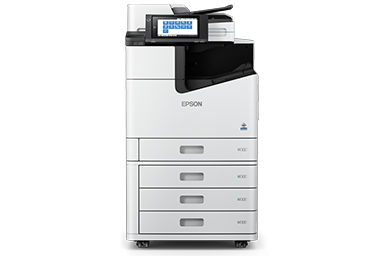 A business-grade color MFP is the right tool once a small office outgrows a desktop printer.
Here’s the rough map we use as a starting point. Your real recommendation comes after we look at your actual page counts.
| Office profile | Monthly pages | What fits | Why |
|---|---|---|---|
| 2–4 people, light printing | under ~1,500 | A good desktop laser or Epson tank printer | A floor copier is overkill; keep it simple and cheap per page |
| 3–10 people, real paperwork | ~1,500–8,000 | Kyocera ECOSYS or Epson WorkForce MFP, ~25–35 ppm, color, strong ADF | Business-grade reliability and low cost per page without paying for capacity you won’t use |
| 10–25 people, shared & busy | ~8,000–25,000 | Ricoh IM-series color MFP, 35–50 ppm, finishing options | Built for a shared queue, heavier duty cycle, room to grow |
Kyocera’s draw for a small office is a long-lived imaging unit and a low cost per page. Epson’s WorkForce business inkjets run cooler, use less power, and have closed the speed gap on laser for everyday office work. Ricoh is where we go when a small office is really a busy office — more speed, heavier duty cycle, and finishing (stapling, booklets) that a growing team starts to want. None of them is “the best copier” in the abstract; each is the best copier for a particular office.
Color or black-and-white — which does a small business really need?
Most small offices need color, but far less of it than they buy. Color pages cost roughly five to ten times what a black-and-white page costs, so a machine set to print everything in color quietly inflates the bill. The move that saves the most money isn’t buying a mono-only machine; it’s getting a color MFP and setting black-and-white as the office default, so color is a deliberate choice for the documents that need it (proposals, marketing, client-facing materials) and everything internal prints cheap.
If you genuinely never print anything client-facing — a back-office bookkeeping shop, say — a monochrome machine is cheaper up front and per page, and there’s no shame in it. For everyone else, a color MFP with smart defaults beats a mono machine you’ll outgrow the first time you need a color proposal.
Buy it or lease it?
For most small businesses, leasing wins. It keeps cash free, bundles toner and on-site service into one predictable payment, and lets you upgrade when you outgrow the machine instead of owning a boat anchor. Buying outright makes sense only if you have the capital sitting idle and you’re certain your volume won’t change for five years, which few small businesses can honestly say. We keep the full breakdown on our copier leasing in Orlando page, including how we keep the service agreement separate from the finance term so a bad month on one never traps you in the other.
One sizing note so you don’t over-buy on either path: match the machine to your office with what size copier your office needs before you sign anything. The right size is the single biggest lever on your five-year cost.
The mistakes we see small businesses make
The two most common, in order. First, over-buying: a six-person office talked into a 60-ppm production machine because the monthly payment “wasn’t much more.” It’s capacity you pay to own and never use. Second, chasing the lowest sticker price on a desktop printer and paying for it in cartridges: the machine is cheap, but the toner is a subscription you didn’t know you signed up for. A close third: signing a lease without reading how toner, service, and overage pages are billed. The machine is rarely the problem; the fine print is. We put 500+ Florida businesses on equipment over 15 years, and almost every “this copier is terrible” call turns out to be the wrong-sized machine or a contract nobody explained, not a bad brand.
Key takeaways
- The best small-business copier is the smallest business-grade color MFP (around 25–35 ppm) that clears your monthly pages with headroom, not the biggest one you can finance.
- Size by duty cycle the right way: your monthly volume should sit near a machine’s recommended count (about 10% of its max rated duty cycle, per Ricoh’s duty-cycle guidance), not its maximum.
- Get color but default to black-and-white — color runs 5–10× the per-page cost.
- Kyocera, Ricoh, and Epson all make the right machine; which one depends on your volume and paper handling, not the badge.
- For most small businesses, leasing with toner and service bundled beats buying — compare the all-in cost per page, not the monthly payment.
Frequently asked questions
What’s the best copier for a small business?
For most small offices it’s a business-grade color multifunction machine in the 25–35 ppm range with a strong document feeder, leased with toner and service included. Among the brands we carry, a Kyocera ECOSYS or Epson WorkForce MFP fits a typical 3-to-10-person office; a Ricoh IM-series machine fits a busier shared office. The “best” one is whichever matches your monthly page count without overshooting it.
Should I buy a copier or lease one for my small business?
Lease it, in most cases. Leasing keeps your cash free, folds toner and on-site service into one predictable monthly cost, and lets you upgrade as you grow instead of owning aging hardware. Buying outright only pays off if you have idle capital and genuinely stable volume for years.
Kyocera or Epson for a small office?
Both are solid, and it comes down to workload. Kyocera ECOSYS laser MFPs are the workhorse pick for steady document printing with a very low cost per page. Epson WorkForce business inkjets run cooler, draw less power, and match laser speed for everyday office work, which is why they’re a favorite for offices watching their energy bill. We’ll match it to your volume.
How many pages per minute does a small office need?
25 to 35 ppm is comfortable for most small offices, and 40-plus is worth it only for a busy machine several people share. Speed matters at your busiest moment, not your daily average, so size for the morning rush rather than the monthly total.
Do I need a color copier or is black-and-white enough?
Most offices should get a color machine but set black-and-white as the default, since color costs roughly 5–10× more per page. That way color is there when a proposal or client document needs it, and your everyday internal printing stays cheap. A pure back-office shop that never prints client-facing pages can save with a mono-only machine.
Is a cheap desktop printer good enough for a small business?
For a two- or three-person office printing a few hundred pages a month, yes — a quality desktop laser or tank printer is the right call, and a floor copier would be overkill. You’ve outgrown it once you’re buying toner constantly, waiting in line at the machine, or scanning stacks of paper one sheet at a time.
What size copier does a 5–10 person office need?
Usually a 25–35 ppm color MFP rated for well above your monthly page count. The quickest way to get it right is to estimate your busiest month and pick a machine whose recommended monthly volume clears it comfortably — our copier sizing guide walks through the math.
Can a small business lease a copier with little money down?
Yes — most business copier leases are designed for low or no upfront cost, with next-day approval common for established businesses and workable options for newer ones. The monthly payment, not a big deposit, is how the machine gets into your office.
Want a copier matched to your actual page counts, not a sales quota?
Get a straight, itemized quote →