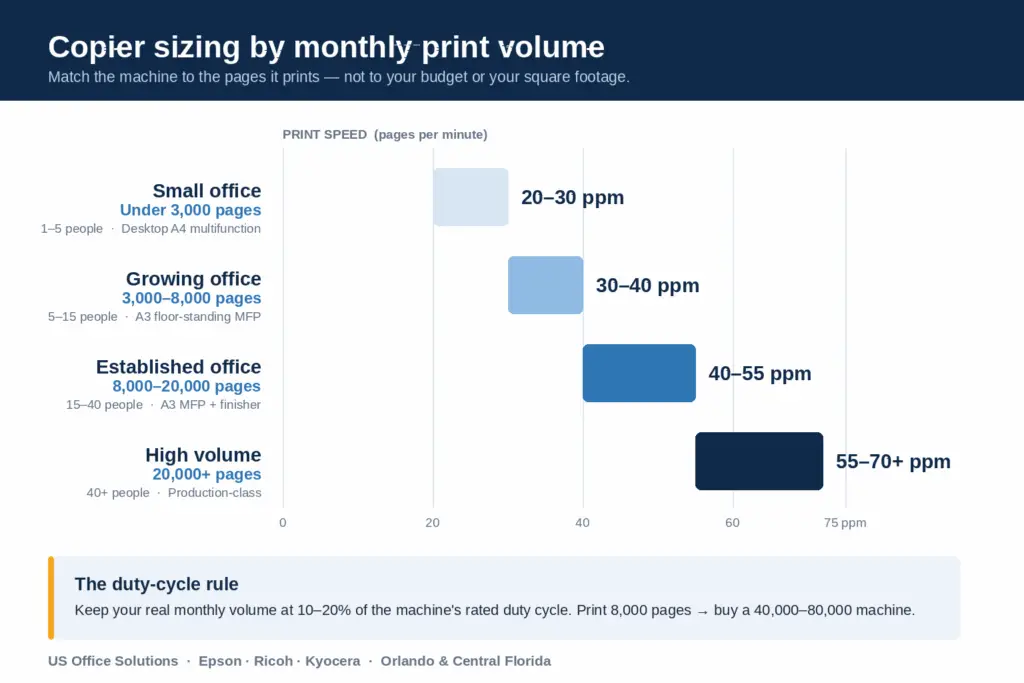
Short answer: Match your copier to your monthly print volume, not your budget or your square footage. Under 3,000 pages a month, a 20–30 ppm desktop multifunction is plenty; 3,000–8,000 pages calls for a 30–40 ppm floor-standing unit; 8,000–20,000 pages needs 40–55 ppm; and past 20,000 pages you’re into 55–70+ ppm production-class machines. Get that one number right and lease price, toner cost, and service calls all fall into place.
We size copiers for Orlando and Central Florida offices every week, and the same mistake shows up over and over: people shop by price or by brand before they’ve counted a single page. Here’s how to do it in the right order. If your office is in town, our Orlando copier leasing page covers the lease terms we offer locally.
How do I figure out my office’s monthly print volume?
Count your paper, not your guesses. The fastest method: look at how much paper you buy. One case of paper is 5,000 sheets (ten reams of 500). If your office goes through two cases a month, you’re printing roughly 10,000 pages — before you factor in that most jobs are single-sided. If you already have a copier, the built-in meter gives you the exact number: on most Ricoh and Kyocera machines it’s under Settings > Counter, and on Epson business units it’s in the maintenance menu. Pull three months and average them, because February and an end-of-quarter month rarely match.
Why does monthly volume matter more than the number of people?
Because a five-person law office can out-print a twenty-person software company. Headcount is a rough proxy; documents per person is the real driver. A firm running discovery, closing binders, and client copies might push 12,000 pages with six people. A design studio that lives in the cloud might do 1,500 pages with fifteen. Count the pages, then sanity-check against your team size — if the two disagree wildly, trust the meter.
What’s a duty cycle, and why shouldn’t I run a copier at its limit?
Every copier lists a monthly duty cycle — the maximum pages it can physically produce in a month. That number is a ceiling, not a target. A machine rated for 20,000 pages will technically hit it, but running near the ceiling month after month is how you get paper jams, worn fusers, and a device that dies a year early. The practical rule we use: keep your actual monthly volume around 10–20% of the rated duty cycle. If you print 8,000 pages, you want a machine rated for 40,000–80,000, not one rated for exactly 8,000. That headroom is the difference between a copier that lasts the whole lease and one you’re fighting with by month ten.
Copier sizing by monthly volume (quick reference)
| Office | Users | Pages / month | Recommended machine |
|---|---|---|---|
| Small office | 1–5 | Under 3,000 | 20–30 ppm desktop A4 multifunction (entry Kyocera, Epson WorkForce-class) |
| Growing office | 5–15 | 3,000–8,000 | 30–40 ppm A3 floor-standing MFP (Kyocera / Ricoh); color + 11×17 + light finishing |
| Established office | 15–40 | 8,000–20,000 | 40–55 ppm A3 MFP with stapling finisher and extra drawers (Ricoh mid-range) |
| High volume | 40+ | 20,000+ | 55–70+ ppm production-class Ricoh, high-capacity trays, booklet finishing |
Speeds are pages per minute (ppm); a 40 ppm machine prints a 20-page report in about 30 seconds — which matters more than it sounds when three people are waiting at the tray before a 9 a.m. meeting.
Do I need color, or will black-and-white save me money?
If more than about one in five of your pages is color, get a color machine — but set it up so staff default to black-and-white. Color pages cost roughly five to ten times more per page than mono in most service agreements, so the savings live in the settings, not the hardware. A mostly-text office (accounting, legal, medical charts) is usually fine on a mono unit with a small color device on the side for the occasional brochure. A marketing or real-estate office that prints listings and flyers should buy color and manage it with per-user rules.
Should I lease or buy once I know the size?
Sizing comes first; the lease-or-buy decision comes second, and it changes with the size. Small desktop units under about $1,500 are often worth buying outright. Once you’re into floor-standing A3 machines that run several thousand dollars and need regular service, a lease that bundles maintenance and toner usually pencils out better for cash flow — and it lets you right-size again in three to five years when your volume has changed. We walk through the actual numbers in our copier leasing cost guide and our lease-versus-buy breakdown for Florida businesses.
What we tell Central Florida offices to do first
Before you talk price with anyone, do three things: pull three months of your real page counts, split them into color versus black-and-white, and note your busiest single day. Bring those three numbers to the conversation. Any honest copier company can size you correctly from them in about five minutes — and you’ll immediately spot the sales rep who tries to sell you two tiers up “just to be safe.” At US Office FL we run a free equipment evaluation on exactly these numbers, matching offices across Orlando, Lake Mary, Maitland, Winter Park, and Lake Nona to the right Epson, Ricoh, or Kyocera machine to lease or buy, with local service across Orlando and Central Florida.
Key takeaways
- Monthly page volume is the number that sizes your copier — count paper cases or read the meter, don’t guess.
- Keep real volume at 10–20% of the rated duty cycle so the machine lasts the whole lease.
- Match speed to volume: 20–30 ppm under 3,000 pages, 30–40 up to 8,000, 40–55 up to 20,000, 55–70+ above that.
- Buy color only if color is over ~20% of your pages, and default staff to mono printing to control cost.
- Size first, then decide lease versus buy — the answer flips as the machine gets bigger.
Frequently asked questions
How many pages a month can a small office copier handle?
A 20–30 ppm desktop multifunction comfortably handles under 3,000 pages a month. It can physically do more, but running it hard shortens its life — if you’re regularly over 3,000, step up to a floor-standing unit.
What does “ppm” mean on a copier?
Pages per minute — how fast the copier prints. A 40 ppm machine prints 40 letter-size pages every minute. Higher ppm mostly matters when several people share one device and wait on it during busy stretches.
Is it bad to run a copier near its maximum duty cycle?
Yes. The duty cycle is a maximum, not a recommended volume. Keeping your monthly pages around 10–20% of that maximum prevents jams, reduces service calls, and gets you the full life out of the machine.
Should a small business lease or buy a copier?
Small desktop units are often worth buying; floor-standing A3 machines that need service are usually better leased, because the lease bundles maintenance and toner and lets you upgrade as your volume changes. Size the machine first, then run the lease-versus-buy numbers.
Copier & printer specialist helping Orlando and Central Florida businesses right-size, lease, and service Epson, Ricoh, and Kyocera equipment.
Not sure which tier your office falls into? Send us three months of page counts and we’ll size it for you — free.
Get a free equipment evaluation